 English (Canada)
 Dansk
Dansk Deutsch
 English
 English (UK)
 Español
 Francais
 Italiano
 Magyar
 Nederlands
 Norsk
Norsk Polski
 Português (Brasil)
 Pycckui
 Suomi
Suomi Svenska
 עברית
עברית العربية
 日本语
日本语 繁體中文
繁體中文 한국어
한국어
What is a server adapter?
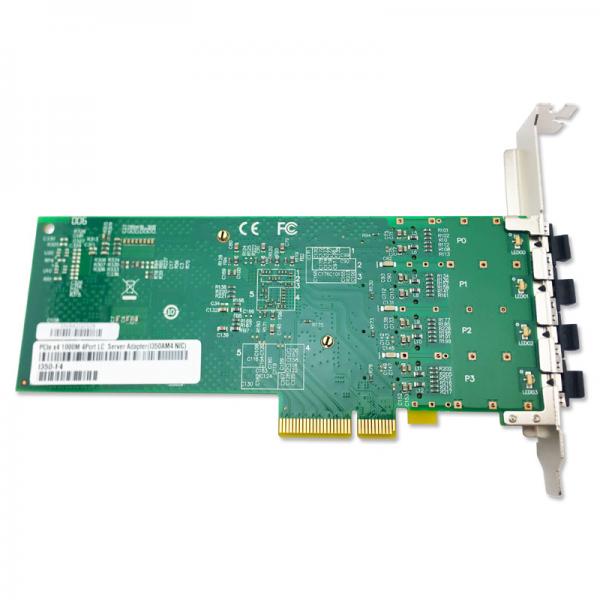
A server adapter is a critical component in modern computing environments, serving as the bridge between a server and the network or storage infrastructure it connects to. It plays a pivotal role in ensuring that data can be efficiently transmitted and received, facilitating seamless communication between servers, storage devices, and client systems. Depending on the specific use case, server adapters can be designed to handle networking, storage, or both. These devices are often implemented as hardware components, such as network interface cards (NICs) or host bus adapters (HBAs), and they are an essential part of maintaining high performance and reliability in enterprise IT systems.
To better understand what a server adapter is and its role in IT infrastructure, it’s important to break down its functions, types, and real-world applications. Below, we’ll explore these aspects in detail.
Key Functions of a Server Adapter
-
Data Transmission: At its core, a server adapter facilitates the transfer of data between the server and other devices on a network or within a storage environment. This could involve sending data packets over a Local Area Network (LAN), accessing files from a storage area network (SAN), or communicating with other servers in a cluster.
-
Protocol Translation: Server adapters often handle protocol translation to ensure compatibility between the server and the network or storage medium. For example, a Fibre Channel HBA translates Fibre Channel protocols to work with the server's internal architecture.
-
Performance Optimization: Many server adapters are equipped with advanced features to offload processing tasks from the server’s CPU. For instance, modern NICs often include technologies like TCP/IP offloading, which reduces the CPU workload associated with network communications.
-
Error Detection and Correction: High-quality server adapters include mechanisms for error detection and correction, ensuring data integrity during transmission. This is particularly important in enterprise environments, where data accuracy is critical.
-
Scalability and Redundancy: Server adapters often support features like link aggregation or multipath I/O, which allow for increased bandwidth and redundancy. These capabilities are essential for environments that require high availability and fault tolerance.
Types of Server Adapters
Server adapters can be broadly categorized based on their primary function and the technology they use to connect to the server and the external infrastructure. Below are the most common types:
-
Network Interface Cards (NICs): NICs are the most common type of server adapter. They enable servers to connect to a network, whether it's a LAN, WAN, or the internet. NICs are available in various speeds, including 1Gbps, 10Gbps, 25Gbps, and even up to 100Gbps or more for high-performance applications. They can support different network protocols, such as Ethernet, InfiniBand, or Wi-Fi.
-
Host Bus Adapters (HBAs): HBAs are designed to connect servers to storage networks, such as SANs. They typically use protocols like Fibre Channel, iSCSI, or NVMe over Fabrics (NVMe-oF). HBAs are essential for environments that require high-speed access to shared storage resources.
-
Converged Network Adapters (CNAs): CNAs combine the functionality of NICs and HBAs into a single device, allowing servers to connect to both network and storage infrastructures. This can simplify hardware requirements and reduce costs while still providing high performance.
-
Storage Adapters: These adapters are specifically designed to connect servers to direct-attached storage (DAS) devices. They may use interfaces like Serial Attached SCSI (SAS) or Serial ATA (SATA) to connect to hard drives or solid-state drives.
-
Virtual Network Adapters: In virtualized environments, virtual network adapters are software-based components that emulate the functionality of physical NICs. They allow virtual machines (VMs) to communicate with each other and the external network.
Features to Consider When Choosing a Server Adapter
Selecting the right server adapter for your needs can significantly impact the performance and reliability of your IT infrastructure. Here are some key features to consider:
-
Speed and Bandwidth: The adapter’s speed should match or exceed the requirements of your network or storage environment. For example, a 10Gbps NIC would be suitable for most enterprise networks, but high-performance applications may require 25Gbps or higher.
-
Compatibility: Ensure that the adapter is compatible with your server’s hardware and operating system. Most adapters are designed to work with a wide range of servers, but it’s always a good idea to double-check compatibility before purchasing.
-
Port Density: Some server adapters come with multiple ports, allowing a single adapter to connect to multiple networks or storage devices. This can be useful for redundancy or load balancing.
-
Offloading Capabilities: Look for adapters that support offloading tasks like TCP/IP processing, encryption, or compression to reduce the load on the server’s CPU.
-
Virtualization Support: If you’re running a virtualized environment, choose an adapter that supports technologies like Single Root I/O Virtualization (SR-IOV) or VMware NetQueue to optimize performance for virtual machines.
-
Form Factor: Make sure the adapter fits into your server’s available expansion slots. Common form factors include PCIe and mezzanine cards.
-
Reliability and Support: Enterprise-grade server adapters often come with features like error correction, diagnostics, and vendor support. These can be invaluable for maintaining uptime and quickly resolving issues.
Real-World Applications of Server Adapters
-
Data Centers: In data centers, server adapters are used to connect servers to high-speed networks and storage systems. They play a crucial role in supporting cloud computing, big data analytics, and other resource-intensive applications.
-
High-Performance Computing (HPC): HPC environments require extremely low-latency and high-bandwidth connections. Specialized server adapters, such as those using InfiniBand, are often employed in these scenarios.
-
Virtualized Environments: Server adapters are essential for enabling communication between virtual machines and the physical network. Advanced features like SR-IOV and NetQueue are particularly useful in these settings.
-
Enterprise Applications: Businesses rely on server adapters to support critical applications like email, databases, and enterprise resource planning (ERP) systems. High-performance adapters ensure that these applications run smoothly and without interruptions.
-
Edge Computing: In edge computing scenarios, where data is processed closer to its source, server adapters are used to connect edge servers to local networks and cloud resources.
Common Challenges and Solutions
-
Bottlenecks: One common issue with server adapters is network or storage bottlenecks. To address this, consider upgrading to higher-speed adapters or using technologies like link aggregation to increase bandwidth.
-
Compatibility Issues: Sometimes, a server adapter may not be fully compatible with your server or operating system. Always check the manufacturer’s compatibility list and update firmware and drivers as needed.
-
Latency: High latency can impact application performance. Look for adapters with low-latency features, such as RDMA (Remote Direct Memory Access), to minimize delays.
-
Configuration Complexity: Setting up server adapters can be complex, especially in virtualized or multi-network environments. Using management software provided by the adapter’s manufacturer can simplify this process.
-
Hardware Failures: Like any hardware component, server adapters can fail. To mitigate this risk, implement redundancy through multiple adapters or use adapters with built-in failover capabilities.
Server adapters are indispensable in today’s IT ecosystems, providing the connectivity and performance needed to support a wide range of applications and workloads. By understanding their functions, types, and features, you can make informed decisions that enhance the reliability and efficiency of your infrastructure. Whether you’re managing a small business server or a large-scale data center, the right server adapter can make a significant difference.


